


Models

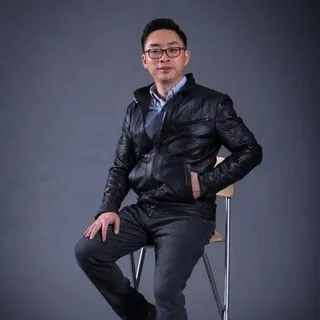
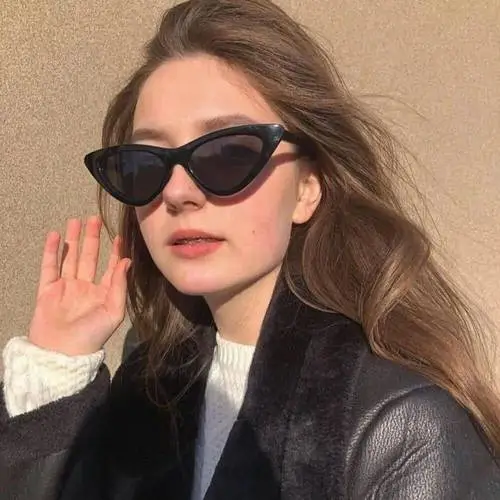
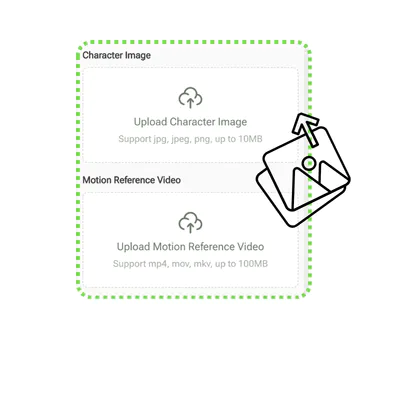
Character Image

Upload Character Image
Support jpg, jpeg, png, up to 10MB

Motion Reference Video

Upload Motion Reference Video
Support mp4, mov, mkv, up to 100MB

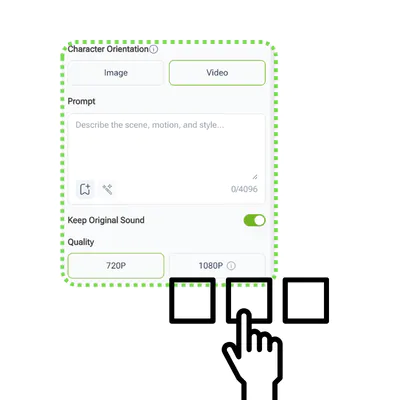
Character Orientation

Prompt

0/4096
Keep Original Sound

Quality

Kling 3.0 Motion Control

Direct precise camera movements and animate images online using VisualGPT's Kling 3.0 Motion Control for free.

VisualGPT - Rated 4.9+ by VisualGPT Users
Rated 4.9+
by VisualGPT Users
VisualGPT - Rated 4.9+ by VisualGPT Users
VisualGPT - 50k+ Pictures Create
50M+
Pictures Created
VisualGPT - 50k+ Pictures Create
VisualGPT - Trusted By 100+ Organizations
Trusted By 800+
Organizations
VisualGPT - Trusted By 100+ Organizations

Helping creators & businesses everywhere work easier

Spotify
YouTube
TikTok
Amazon
Business Insider
Forbes
ABC
Buzfeed
CBS
Fox
NBC
Yahoo
Mashable
LifeWire
BBC
Nature
Spotify
YouTube
TikTok
Amazon
Business Insider
Forbes
ABC
Buzfeed
CBS
Fox
NBC
Yahoo
Mashable
LifeWire
BBC
Nature
Spotify
YouTube
TikTok
Amazon
Business Insider
Forbes
ABC
Buzfeed
CBS
Fox
NBC
Yahoo
Mashable
LifeWire
BBC
Nature

Kling 3.0 Motion Control: Precise Camera & Character Control

VisualGPT's Kling 3.0 Motion Control is the ultimate tool to direct precise camera movements and animate images online for free with no sign up required.

Start Generating Now
Kling 3.0 Motion Control

What is Kling 3.0 Motion Control?

Kling 3.0 Motion Control is a revolutionary cinematic engine designed for creators who demand absolute precision. Built by VisualGPT, this platform allows you to transform static pictures into dynamic visuals effortlessly. Whether you want to animate images or direct complex tracking shots, test it today via a free trial with no sign up required to start directing your cinematic vision online instantly. Explore more tool try AI Dance Generator and Motion Control AI.

What is Kling 3.0 Motion Control

Why Choose Kling 3.0 Motion Control?

Stop relying on unpredictable text prompts that yield random results. This powerful generation engine from VisualGPT provides professional rendering for modern filmmakers and designers. Users can direct precise camera movements using Kling 3.0 Motion Control, seamlessly controlling pan, tilt, and zoom to completely transform static artwork into dynamic video scenes without downloading any heavy desktop software.

Why Choose Kling 3.0 Motion Control

Tired of Random Video Generation and Character Morphing?

Traditional generative video platforms often ignore structural consistency, resulting in weird character morphing and chaotic background shifts. This unpredictable workflow wastes hours of rendering time. Kling 3.0 Motion Control completely eliminates these issues. It naturally locks character features while allowing you to guide the exact trajectory of the shot, ensuring the final output matches your specific creative intent perfectly.

Tired of Random Video Generation and Character Morphing

Key Features of Kling 3.0 Motion Control

Discover the breakthrough capabilities that give you ultimate control over your cinematic generations instantly.

Direct Precise Camera Movements

Take the director's chair. You control the exact virtual lens dynamics, executing cinematic pans, dramatic tilts, and smooth tracking shots with absolute physical accuracy.

Character Motion Control

Lock structural consistency effortlessly. The system calculates physical dynamics perfectly, allowing specific subjects to move naturally without degrading the original anatomy or background elements.

Animate Images Instantly

Bring your highest quality static artwork to life. The engine breathes dynamic movement into flat photos, transforming them into captivating short films while maintaining stunning hyperrealistic fidelity.

How to Use Kling 3.0 Motion Control

Master our free AI video generator. Easily direct camera movements and animate images with precise motion transfer in three simple steps.

Step 1: Upload Image & Video

Step 1: Upload Image & Video

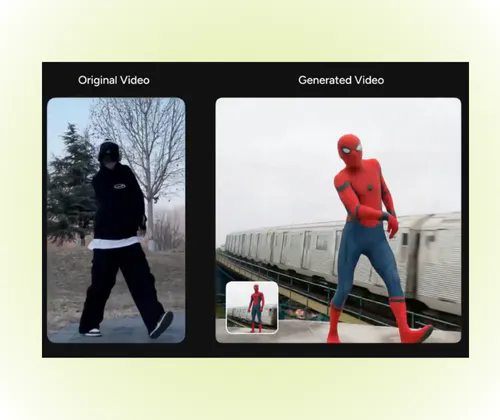
Upload a character image (up to 10MB) and a motion reference video (up to 100MB). This guides the AI to map physical movements accurately.

Step 2: Customize Settings

Step 2: Customize Settings

Describe your scene in the prompt box. Choose character orientation, toggle the keep original sound option, and select 720P or 1080P.

Step 3: Generate & Download

Step 3: Generate & Download

Start the rendering process to execute the motion transfer. Review and download the final high-quality video directly from VisualGPT.

Try Kling 3.0 Motion Control Today

Are you ready to completely transform your visual storytelling capabilities? Try Kling 3.0 Motion Control online free now and experience unprecedented cinematic generation powered by VisualGPT.

Start Directing Now

What Creators Say About Kling 3.0 Motion Control

S.K. avatar

S.K.

Agency Director

We used to waste hours prompting generic AI video tools, only to get chaotic results with zero camera logic. Discovering VisualGPT completely changed our workflow. Utilizing Kling 3.0 Motion Control allows us to dictate exact cinematic pans and zooms. The way it maintains temporal consistency while moving the virtual lens is unbelievably realistic, saving our agency thousands of dollars in rendering time and frustration.

D.L. avatar

D.L.

Fashion Creative Director

Finding a tool that can actually animate images without making the subject's face melt into the background is rare. The physical accuracy generated by Kling 3.0 Motion Control is absolutely staggering. I can define specific camera paths on a static fashion image, and the system instantly recognizes the fabric folds and depth, creating a dynamic cinematic shot effortlessly. It is an indispensable tool for any modern creative.
J.T. avatar

J.T.

Digital Artist

As a digital artist, turning my static illustrations into dynamic scenes used to take weeks of manual keyframing. The advanced platform provided by VisualGPT maps the physical depth of my artwork perfectly right out of the box. Integrating Kling 3.0 Motion Control into my daily pipeline has been a game-changer. It effortlessly animates images and allows me to direct precise camera movements, making my portfolio pop with stunning realism.
M.R. avatar

M.R.

Cinematic Producer

I honestly thought the claims of adding realistic virtual camera tracking were exaggerated until I tested this tool myself online. The physical consistency when you direct precise camera movements is staggering. Kling 3.0 Motion Control handles complex background parallax beautifully, making it the ultimate tool for producing high-quality cinematic clips without harsh, unnatural warping. It rescues static assets that I previously thought were flat.
A.W. avatar

A.W.

Design Startup Founder

The fact that this tier of professional artificial intelligence is available for free without any sign up barrier is industry-shaking. Our design startup integrated this engine into our pipeline instantly. Getting this capability through VisualGPT has drastically improved our final visual quality. Leveraging Kling 3.0 Motion Control slashes our monthly production bills and empowers our entire team to animate images much faster.
K.B. avatar

K.B.

Global Content Producer

The pure visual quality and temporal stability generated by this cinematic tool are unprecedented. We process content for global campaigns, and this versatile engine supports realistic studio tracking shots perfectly. Whether we need to animate images of outdoor lifestyle shots or add dramatic push-ins to a cyberpunk character, Kling 3.0 Motion Control saves us countless hours of tedious post-production and perfectly enhances our visual storytelling.

FAQs About Kling 3.0 Motion Control