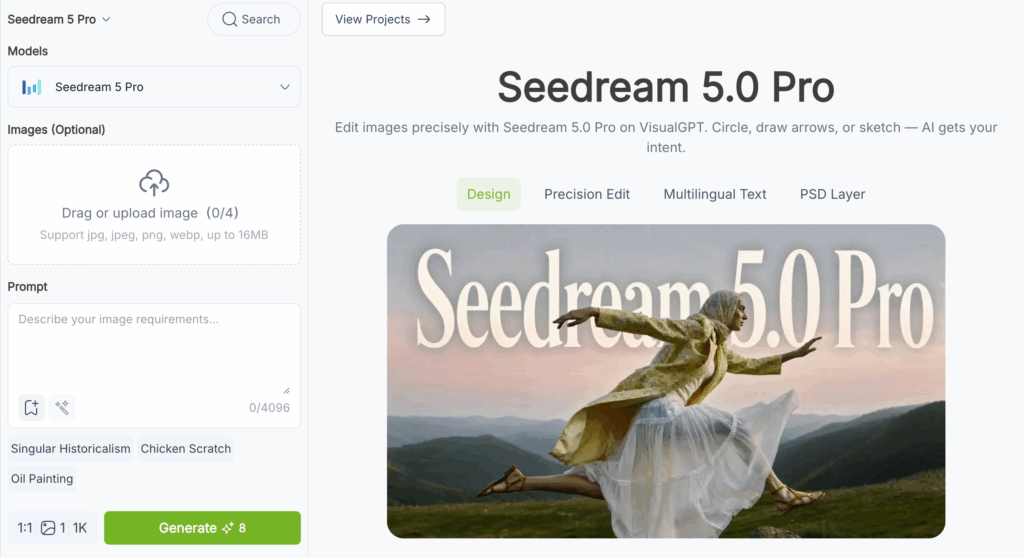
Seedream 5.0 Pro, ByteDance's flagship image generation model released July 2026, demands a fundamentally different approach to prompt writing. This is not a model that rewards vague aesthetic keywords — it rewards specificity, structure, and clear instruction. An effective Seedream 5.0 Pro prompt defines a complete deliverable: composition, lighting direction, in-image text, layer separation, and edit constraints all at once. The gap between mediocre results and production-ready images comes down to whether your Seedream 5.0 Pro prompt provides enough concrete information for the model to work with. Each example in this guide is a complete, tested prompt you can copy, adapt, and use immediately. Try them on VisualGPT's Seedream 5.0 Pro interface.
The 5-Element Seedream 5.0 Pro Prompt Formula
After testing hundreds of prompts on VisualGPT, I landed on a five-element formula that produces consistent results across every generation mode — text-to-image, image-to-image, editing, and layer separation. The model processes each section independently before composing the final image, so skipping a section does not break output, but including all five gives predictable, repeatable results. Every effective Seedream 5.0 Pro prompt I have written follows this structure, and once you internalize it, the quality jump is immediate.
8 Seedream 5.0 Pro Prompt Examples
Each example below is a complete, tested Seedream 5.0 Pro prompt that I have generated and iterated on VisualGPT. Every prompt is followed by a breakdown of why each element earned its place. Copy any prompt in full, swap in your own subject and setting details, and generate — the structure is what matters. The eight examples cover the full range of what Seedream 5.0 Pro prompt can do: product photography, infographics, portraits, multilingual posters, region edits, multi-reference fusion, layer separation, and cinematic scenes.
1. Product Photography — Luxury Watch
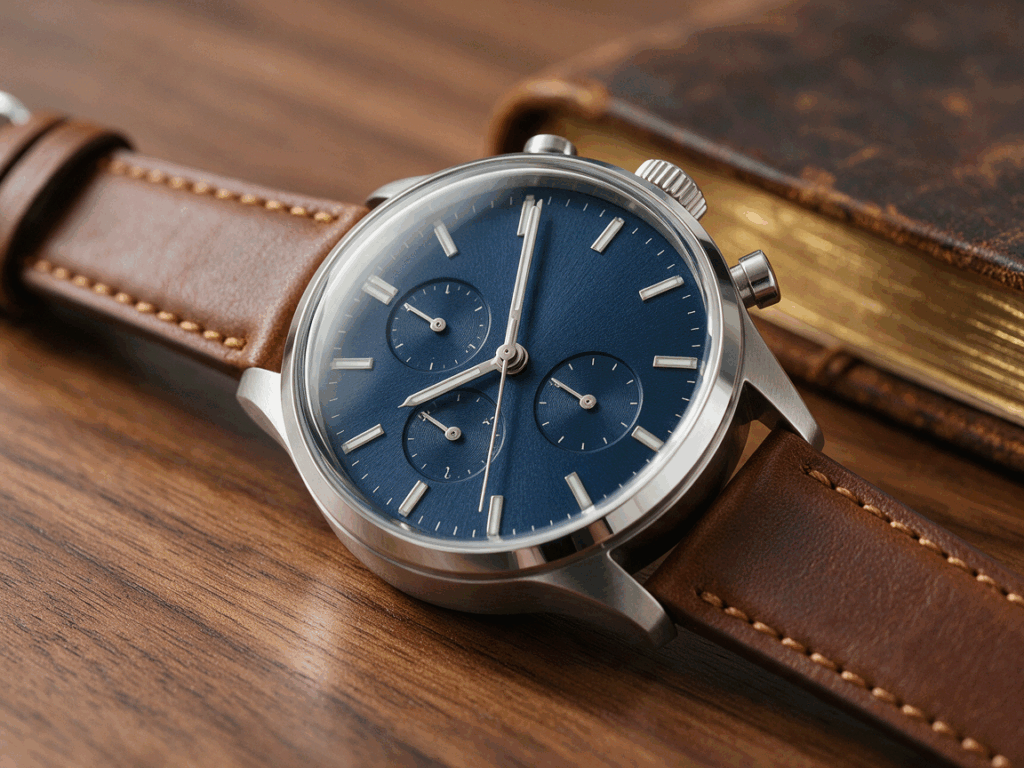
Subject: A stainless steel chronograph watch with a navy blue textured dial and brown leather strap, positioned at a 45-degree angle on a polished walnut surface. The second hand frozen at the 7 o'clock position. Setting: Studio environment, soft morning light simulation through a large diffuser. A single aged leather journal with worn gold-edged pages sits partially visible in the defocused background, adding depth without distraction. Composition: Close-up framing, slightly elevated 30-degree angle looking down, 100mm macro lens feel, f/4.0 aperture chosen deliberately to keep the entire dial sharp while allowing the background to fall off naturally. 1:1 square format suitable for e-commerce product grids. Lighting + palette: Key light from top-left at 45 degrees with a large softbox for broad even coverage. Silver reflector positioned at camera-right for subtle fill on the strap side. Navy blue, brushed steel silver, warm walnut brown, muted gold as the four palette anchors. Constraints: No text or numerals on the watch face. No dust particles or scratches on any surface. Clean specular highlights limited to the metal bezel edge only — no blown-out reflections on the crystal.
Why this works: Every material is named (stainless steel, textured dial, leather, walnut). The lighting describes both source and modifier (softbox, reflector). The aperture is justified — wide enough for subject isolation but stopped to f/4.0 to keep the dial sharp, a common failure point in AI product photography. The second hand position is a deliberate detail that makes the image feel intentionally shot. This Seedream 5.0 Pro prompt specifically targets common artifacts — hallucinated text, training-data dust, and uncontrolled reflections on shiny surfaces.
2. High-Density Infographic — Remote Work Statistics
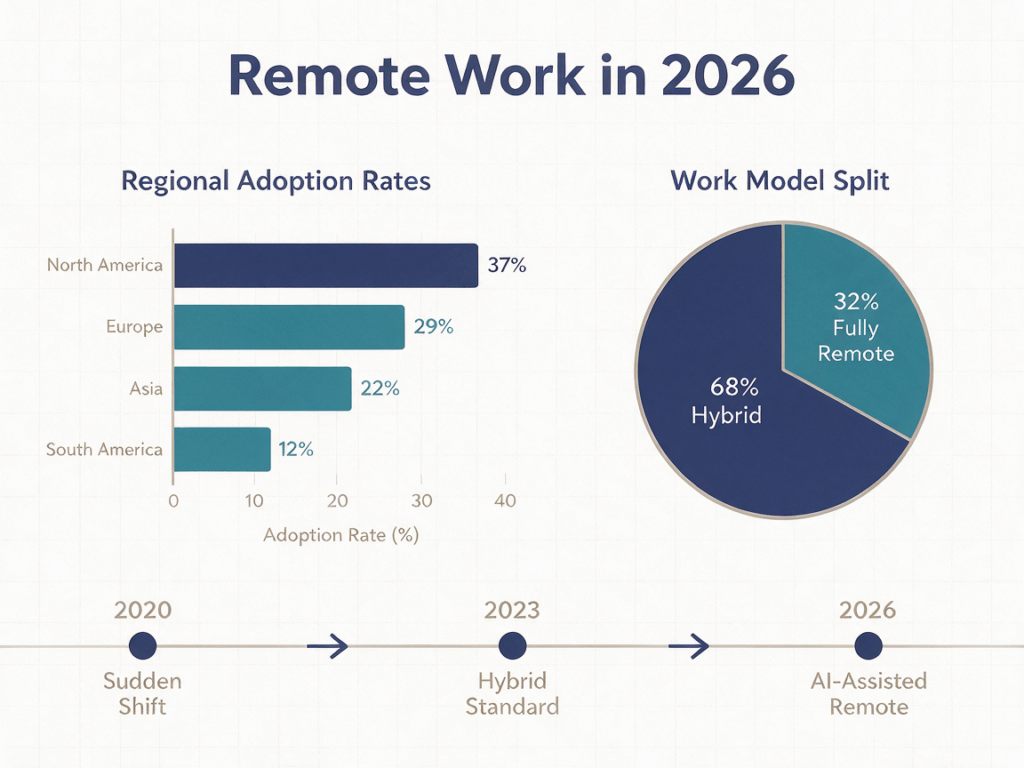
Subject: An editorial-quality infographic with the bold headline "Remote Work in 2026" centered across the top in 24pt sans-serif. Setting: Clean white background with subtle 2% gray grid lines, magazine spread aesthetic. Composition: Three clearly separated zones. Left zone: a horizontal bar chart comparing four regions with exact data labels — North America 37%, Europe 29%, Asia 22%, South America 12%. Right zone: a donut chart showing the hybrid-to-remote split with two segments labeled "68% Hybrid" and "32% Fully Remote." Bottom zone: a three-marker horizontal timeline strip reading "2020 Sudden Shift" → "2023 Hybrid Standard" → "2026 AI-Assisted Remote." 4:5 portrait format. Lighting + palette: Flat even lighting, no shadows. Muted navy (#2B3A67) for bars and data emphasis, teal (#3A7D8C) for secondary elements, warm gray (#8C8C8C) for labels and grid lines. No gradients anywhere — solid flat colors only. Text content: All text rendered natively. Headline in 24pt bold. Data labels in 10pt medium. Timeline markers in 12pt. Every label must be readable at actual size. Constraints: No photographs. No icons, illustrations, or clip art. No drop shadows or 3D effects. Clean flat vector infographic style throughout. No decorative elements of any kind.
Why this works: The layout is specified by named zones (left, right, bottom) with exact data embedded directly. Each text element is quoted and sized. The palette uses hex codes for consistency. Dense information visualization with accurate multi-zone layout, data labels, and typography in a single pass is Seedream 5.0 Pro's strongest differentiator — competing models either hallucinate the data, garble the text, or collapse the layout into an unstructured block.
3. Professional Portrait — Corporate Headshot

Subject: A woman in her early 40s with shoulder-length dark brown hair, light natural makeup, wearing a charcoal gray tailored blazer over a cream silk blouse. Expression is a natural confident half-smile, eyes looking directly at the camera with genuine engagement. Setting: Modern corner office interior with soft natural daylight flooding through floor-to-ceiling windows on the left. A partially blurred wooden bookshelf and a large potted monstera plant visible in the background on the right, providing context without competing for attention. Composition: Medium shot, chest up, shot at exact eye level for a direct and trustworthy feel. 85mm portrait lens aesthetic, f/2.8 for shallow depth of field that separates the subject cleanly from the background. 3:4 portrait aspect ratio. Lighting + palette: Soft diffused daylight from camera-left through the windows acting as key light, with a subtle warm tungsten bounce filling the shadow side from the right wall. Charcoal gray, cream, warm oak wood, deep monstera green as the four palette anchors. Constraints: Absolutely no studio flash look — this must read as natural window light. No overly retouched or smoothed skin texture — preserve natural skin detail including fine lines and pores. Subtle film-like grain for an editorial photography feel rather than a plastic AI-generated look. No catchlights that look artificial.
Why this works: The subject description goes beyond surface traits — age, hair, fabric types, expression specificity ("confident half-smile" instead of the generic "smiling" that produces unnatural AI grins). The background has named objects (bookshelf, monstera) instead of vague fillers. The 85mm f/2.8 lens spec controls portrait compression. The constraint against over-retouching is critical — without skin texture guardrails, Seedream 5.0 Pro defaults to heavily smoothed, plastic-looking faces. A Seedream 5.0 Pro prompt that addresses skin texture explicitly produces headshots that pass as real photography.
4. Multilingual Campaign Poster — Japanese Bakery

Subject: A vertical promotional poster for a Tokyo artisan bakery. Fresh baked croissants with visible flaky layers, thick-cut shokupan loaves with golden crust, and melonpan with crackled cookie tops arranged on a rustic wooden counter. Warm genuine morning sunlight streams through a window visible at the top edge. Setting: Rustic traditional bakery interior with exposed wooden beams. Fine flour dust particles visibly suspended in the shaft of sunlight, adding atmosphere. A small branch of cherry blossoms in a handmade ceramic vase at the far left edge for seasonal context. Composition: Wide establishing shot from a slightly elevated downward angle to show the full counter arrangement. 4:5 vertical format designed for Instagram and social media. Bottom quarter of the frame reserved for text overlay with sufficient negative space. Lighting + palette: Warm golden hour morning light with soft diffused shadows. Beige, cream, warm crust brown, and pale sakura pink as the four palette anchors. Natural warmth — no artificial studio lighting feel. Text content: Japanese headline "パン祭り" displayed across the top in bold rounded sans-serif typography. A smaller supporting line below reading "週末限定" in medium weight. Bottom-right corner text reading "日曜 8:00-18:00" in a clean readable size. All text rendered in native Japanese typography with correct character spacing. Constraints: No English text anywhere in the image. No Western-style fonts or Latin characters. No QR codes, barcodes, or price tags. No people or hands in the frame — the focus is entirely on the bread and the atmosphere.
Why this works: Japanese text is in quotes natively — no romanization needed. Each text block has a position, size cue, and styling note. The language is explicitly declared in constraints to prevent English default. Seedream 5.0 Pro natively supports 14+ languages with correct character rendering — other models typically mangle non-Latin scripts. The "no people" constraint keeps focus on the product and atmosphere.
5. Region Edit — Targeted Object Color Change

Mode: Edit Image (upload your generated image first, then apply this edit prompt) Prompt: Change the ceramic coffee mug on the wooden desk from glossy white to matte black. Change the matching saucer underneath it from white to dark slate gray.
Why this works: The edit-mode Seedream 5.0 Pro prompt follows a strict rule: describe ONLY what changes. The model applies edits exclusively to named objects using spatial context. The most common beginner error is writing preservation instructions like "Keep the lighting the same" — describing what to preserve causes the model to interpret those elements as edit targets and modify them unintentionally. The correct pattern for every edit: name the target object, state the change clearly, stop writing immediately.
6. Multi-Reference Fusion — Product Staging
Reference images: 3 files uploaded to VisualGPT's Seedream 5.0 Pro interface before generating
Why this works: Each reference image gets one explicit role with a boundary statement ("keep exactly," "use only," "ignore all") that prevents cross-contamination. Without role assignments, the model averages features across inputs and produces a blurry composite that captures nothing useful. The prompt then adds new elements not present in any reference and specifies negative space for text overlay, transforming a product image into a ready-to-use hero banner for marketing use.
7. Layer Separation — Editable Skincare Banner
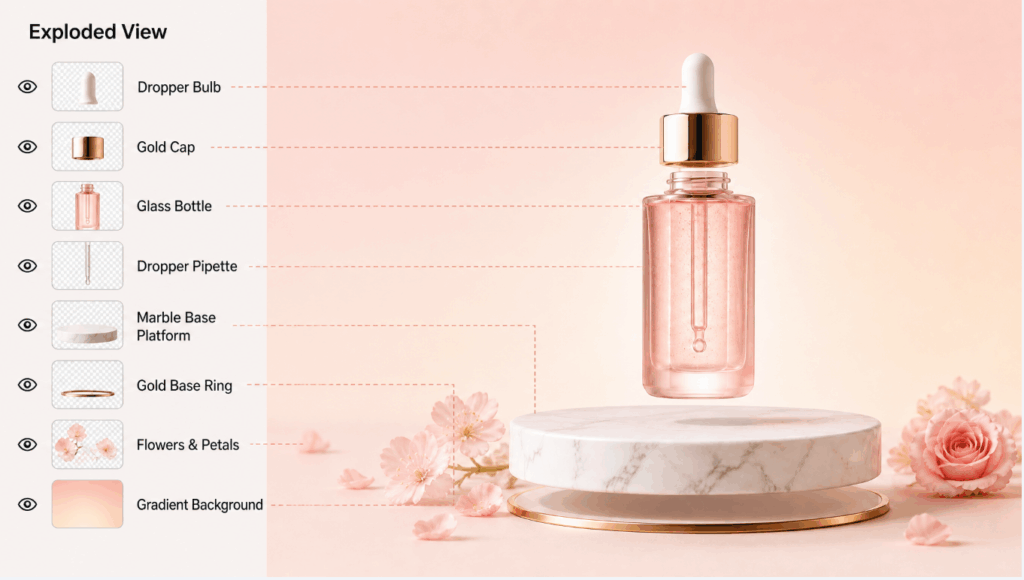
Subject: A promotional product banner for a premium skincare serum launch. The hero element is a translucent frosted-glass serum bottle with a hexagonal gold dropper cap, placed centered on a smooth white marble podium. Setting: A clean studio environment with a soft gradient background transitioning smoothly from pale rose at the top to warm cream at the bottom. The gradient provides visual warmth while keeping the product as the unambiguous focal point. Composition: Product dead center, 16:9 horizontal widescreen format. Ample negative space intentionally preserved on both the left and right sides of the bottle for overlaid marketing text and brand logo placement. The podium occupies the bottom 15% of the frame. Lighting + palette: Soft diffused key light from directly above through a large overhead scrim, with a subtle warm pink bounce card placed below and in front of the bottle to lift shadows on the glass. Rose gold metallic, warm cream, frosted white, pale pink as the four palette anchors. Text content: None in the generated image — all text will be added in post-production using design software. The negative space is designed specifically to accommodate text overlay. Return as exactly 4 separate layers with transparent backgrounds: Layer 1: The gradient background (rose-to-cream, full frame dimensions) Layer 2: The white marble podium with its natural veining Layer 3: The frosted serum bottle with the hexagonal gold dropper (fully isolated) Layer 4: Soft light reflections, highlights on the glass, and the subtle pink bounce light Constraints: Each layer must be independently usable when opened in Photoshop or Figma. Auto-inpaint any hidden areas behind the bottle on the background and podium layers — no cutout holes. The bottle layer must have a clean alpha channel edge with no background bleeding.
Why this works: The layer separation request names exactly 4 layers by function — this precision ensures the model outputs only what you need. The auto-inpaint constraint is critical: without it, separating the bottle leaves a bottle-shaped hole on background layers. This Seedream 5.0 Pro prompt turns a single generation into an editable layered design file openable in Photoshop or Figma. For marketing teams iterating on text or layout without regenerating the entire image, layer separation is the single highest-ROI feature in the toolkit.
8. Cinematic Night Scene — Rainy European Street
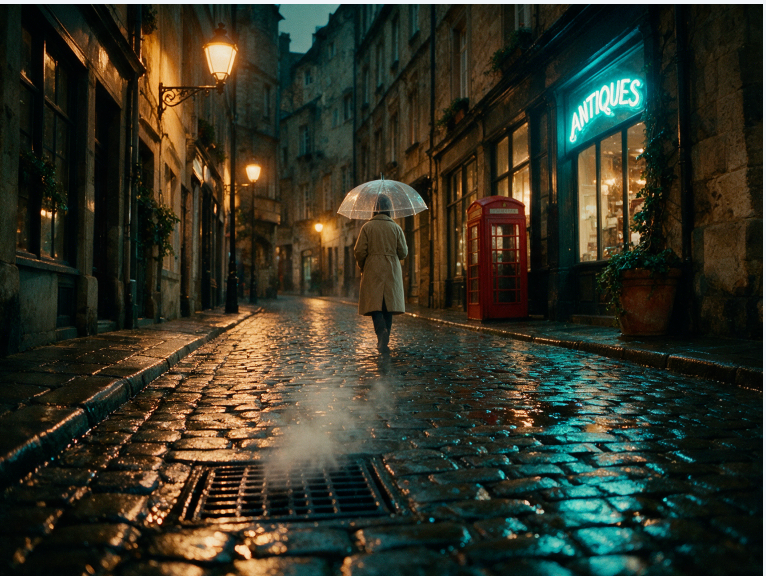
Subject: A solitary figure in a long beige trench coat, holding a transparent bubble umbrella, walking away from the camera down the center of a narrow cobblestone street. The figure's silhouette is distinct but no facial features are visible — the back is fully turned to the viewer. Setting: An old European city street late at night, shortly after heavy rain has stopped. Every cobblestone surface is wet and mirror-like, reflecting the colors of the surrounding light sources. A thin layer of steam rises from a street grate in the foreground. A vintage red telephone booth stands on the right sidewalk. Puddles on the ground reflect the scene above. Composition: Wide cinematic establishing shot from a low angle near ground level, 35mm lens aesthetic, f/2.0 aperture for shallow focus that isolates the walking figure against the textured background. 21:9 ultrawide anamorphic format for a true cinematic feel. Lighting + palette: Complex mixed lighting with two distinct sources. Warm amber glow from vintage-style street lamps lining the left side of the street. Cool cyan-blue neon glow from a shop sign on the right reflecting in the wet cobblestones. Water reflections on every horizontal surface amplify and scatter both light sources. Deep teal shadows, warm amber highlights, and muted red from the telephone booth as a deliberate color accent. Constraints: Absolutely no modern elements visible anywhere in the frame — no cars, no smartphones, no LED screens, no modern signage, no plastic objects. No visible faces on the figure — the character is seen only from behind, creating mystery and mood. Cinematic color grading with a slight teal-and-orange split-tone look. Subtle film grain texture to emulate analog cinematography rather than digital sharpness.
Why this works: The scene is built in depth layers — foreground (steam rising, reflective puddles), midground (figure with umbrella, cobblestone street), background (buildings, telephone booth) — giving the model clear spatial anchors for every element from front to back. Mixed lighting is split by direction and color temperature (amber left, cyan right). Every surface condition is named: wet cobblestones, reflections, steam, film grain. The "no modern elements" constraint prevents the most common atmosphere-breaking artifact. This Seedream 5.0 Pro prompt demonstrates how concrete specifications build atmosphere more reliably than vague mood words like "cinematic" or "atmospheric."
Quick Reference Cheat Sheet
Keep this table open as a reference. Each row is a battle-tested pattern that produces consistent results when followed exactly. I use this cheat sheet every time I write a new Seedream 5.0 Pro prompt from scratch on VisualGPT.
3 Common Seedream 5.0 Pro Prompt Mistakes and Their Fixes
I made every one of these Seedream 5.0 Pro prompt mistakes during testing. If you are learning how to write better Seedream 5.0 Pro prompts, these are the issues that most often affect image quality and consistency. Here is what went wrong and how to fix them.
Mistake 1: Using Vague Quality Adjectives Instead of Specifications
Every adjective in a Seedream 5.0 Pro prompt should be replaceable by a measurable specification. "Beautiful lighting" carries zero actionable information. Replace vague descriptions with concrete parameters: light direction, color temperature, diffusion type, f-stop, material name, or hex code.
This is one of the biggest improvements when adapting Midjourney or DALL·E prompts into effective Seedream 5.0 Pro prompts.
Wrong: "A beautiful portrait with stunning cinematic lighting and a gorgeous background."
Fix: "Soft diffused key light from 45° camera-left through a sheer white curtain, f/2.8 for shallow depth of field, warm amber tungsten fill from a table lamp on the right, deep teal wall in the background with subtle texture."
Mistake 2: Stacking Too Many Negations Instead of Using Positive Constraints
Seedream 5.0 Pro prompt writing works differently from some other AI image generators. Seedream 5.0 Pro does not have a separate negative prompt field, so all restrictions need to be written naturally inside the main prompt.
Stacking too many negative instructions can reduce consistency because each additional negation competes for attention.
Wrong: "No text, no watermarks, no logos, no shadows, no reflections, no people, no cars, no blur, no noise."
Fix: "No text. No watermarks." — then describe everything positively: "Clean product on a white surface. Studio lighting with a single soft shadow directly beneath the item."
Mistake 3: Using Generation Prompt Syntax in Edit Mode
A generation prompt describes an entire scene. A Seedream 5.0 Pro editing prompt should describe only one targeted change.
Writing too many preservation instructions in edit mode can make the model interpret those elements as edit targets.
Wrong (Edit mode): "Regenerate the entire image with a black ceramic mug instead of the white one, keeping the desk, the window light, the plant, and the overall composition exactly the same as the original."
Fix (Edit mode): "Change the ceramic mug from glossy white to matte black. Change the saucer from white to dark slate gray."
FAQ About Seedream 5.0 Pro Prompt Writing
How long should a Seedream 5.0 Pro prompt be?
For simple Seedream 5.0 Pro image generation, 30–80 words are usually enough. Complex scenes such as infographics may require up to 200 words.
Long prompts do not always create better results. Effective Seedream 5.0 Pro prompts focus on precise visual instructions instead of unnecessary descriptions.
Can I reuse my existing Midjourney or DALL·E prompts?
Partially, but they usually need restructuring. Remove style modifiers and parameter flags, then rebuild the prompt using concrete visual specifications.
For example, replace "cinematic lighting" with specific instructions like light direction, color temperature, and camera settings. This makes the prompt more suitable for Seedream 5.0 Pro prompt generation.
Does Seedream 5.0 Pro have a separate negative prompt field?
No. All Seedream 5.0 Pro negative prompts are written directly inside the main prompt. Keep exclusions short and use positive constraints whenever possible.
How do I build a reusable Seedream 5.0 Pro prompt library?
Save every prompt that produces a result you like, including the prompt, output image, and notes about what worked.
Organize your Seedream 5.0 Pro prompt examples by use case: product photography, portraits, infographics, posters, and edits. After collecting enough examples, you can turn successful patterns into reusable templates.
Start Building Your Seedream 5.0 Pro Prompt Library on VisualGPT
The fastest way to learn Seedream 5.0 Pro prompts is through hands-on testing. Try different prompt examples, change one variable at a time, and observe how each instruction affects the output.
After 15–20 iterations, you will develop a better understanding of Seedream 5.0 Pro prompt writing and create your own reusable prompt library.