



















VisualGPT Logo
Midjourney Niji V7 Icon

Models

Media (Optional)

(0/4)
First Frame (Optional)
(0/4)
Last Frame (Optional)

Prompt

Shot 1
0/512
Add Shot (1/6)
0/2500

Enable Sound (Optional)

Aspect Ratio

Duration

5s

Quality

Mode

Seedance 1.5 Pro

Create cinematic videos from text and images with Seedance 1.5 Pro on VisualGPT. Powered by ByteDance.

VisualGPT - Rated 4.9+ by VisualGPT Users
Rated 4.9+
by VisualGPT Users
VisualGPT - Rated 4.9+ by VisualGPT Users
VisualGPT - 50k+ Pictures Create
50M+
Pictures Created
VisualGPT - 50k+ Pictures Create
VisualGPT - Trusted By 100+ Organizations
Trusted By 800+
Organizations
VisualGPT - Trusted By 100+ Organizations

Helping creators & businesses everywhere work easier

Spotify
YouTube
TikTok
Amazon
Business Insider
Forbes
ABC
Buzfeed
CBS
Fox
NBC
Yahoo
Mashable
LifeWire
BBC
Nature
Spotify
YouTube
TikTok
Amazon
Business Insider
Forbes
ABC
Buzfeed
CBS
Fox
NBC
Yahoo
Mashable
LifeWire
BBC
Nature
Spotify
YouTube
TikTok
Amazon
Business Insider
Forbes
ABC
Buzfeed
CBS
Fox
NBC
Yahoo
Mashable
LifeWire
BBC
Nature

Seedance 1.5 Pro: Turn Text & Images into Video by ByteDance

Generate high-quality cinematic videos from text and images with Seedance 1.5 Pro on VisualGPT. Fast, realistic AI video generation powered by ByteDance.

Try Seedance Now
Seedance 1.5 Pro: Turn Text & Images into Video by ByteDance

What is Seedance 1.5 Pro?

Seedance 1.5 Pro is an AI video generator on VisualGPT that turns text to video and image to video into fast, cinematic results. It helps you create realistic AI video content in seconds for social media and ads. Seedance 1.5 Pro includes native audio-visual sync, so sound and visuals are created together, improving speed. It also supports accurate lip-sync in many languages, making Seedance 1.5 Pro ideal for global use. With better control of motion and physics, Seedance 1.5 Pro reduces AI errors in complex scenes. For more options, you can try Kling 3.0 or Seedance 2.0.

What is Seedance 1.5 Pro?

How to Use Seedance 1.5 Pro on VisualGPT

Learn how to create AI videos with Seedance 1.5 Pro on VisualGPT in a few simple steps. This guide shows how to go from image or idea to a finished video using text to video and image to video tools.

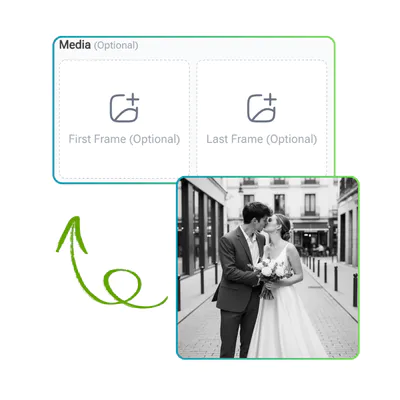
Seedance 1.5 Pro: Step 1 - Upload Your Image (Optional)

Step 1: Upload Your Image (Optional)

Start by uploading an image if you want to guide the video style. Seedance 1.5 Pro can also work without an image, so you can begin from a blank idea and still get strong results on VisualGPT.

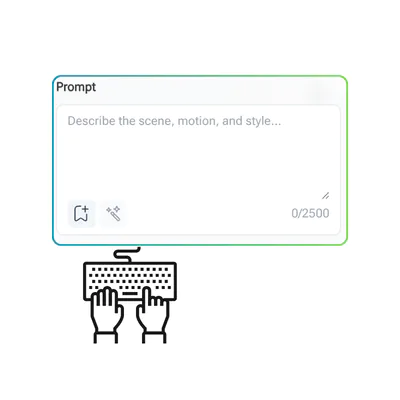
Seedance 1.5 Pro: Step 2 - Write Your Prompt

Step 2: Write Your Prompt

Next, describe what you want in simple words. A clear prompt helps Seedance 1.5 Pro generate better scenes, actions, and motion. You can define style, mood, or camera movement for more control.

Seedance 1.5 Pro: Step 3 - Choose Settings and Generate

Step 3: Choose Settings and Generate

Select the video size and duration, then click generate. Seedance 1.5 Pro on VisualGPT will process your input and create the video. Once ready, you can preview and download your result with ease.

Why Creating Videos Still Feels So Hard

Turning an idea into a video can feel slow and frustrating. Many users try an AI video generator or text to video AI, but the output may lack detail. With image to video AI, motion can look stiff and not natural. Adding sound or fixing lip-sync across languages also takes extra time. These issues can break your workflow and make results less consistent. Seedance 1.5 Pro on VisualGPT helps make this process smoother.

Why Creating Videos Still Feels So Hard

Real Audio and Video Together

Seedance 1.5 Pro on VisualGPT can generate sound and visuals in one step. You don’t need to add audio later, which saves time and keeps the workflow simple. For text to video AI or image to video AI, this helps create complete videos faster. The result feels more natural, with sound matched to each scene.

Real Audio and Video Together

Precise Lip Sync in Many Languages

Seedance 1.5 Pro offers accurate lip-sync that follows speech closely. The mouth movement matches the voice, making videos look more real. It also supports multiple languages like English, Chinese, and Japanese. On VisualGPT, this is useful for global content, avatars, and narration videos.

Precise Lip Sync in Many Languages

Stable Motion and Better Physics

Seedance 1.5 Pro handles complex motion with better stability. It can follow real-world effects like water, smoke, and camera movement more naturally. This helps reduce common AI errors and improves results. On VisualGPT, Seedance 1.5 Pro makes image to video AI outputs smoother and more realistic.

Stable Motion and Better Physics

Create Your First Video in Seconds

Bring your ideas to life with Seedance 1.5 Pro on VisualGPT. Turn text or images into smooth, cinematic videos in just a few clicks. No complex setup, just start creating and see results right away.

Start Creating Now

What Users Say About Seedance 1.5 Pro

S.L. avatar

S.L.

A.M., Content Creator

"Seedance 1.5 Pro on VisualGPT has made my video work much faster. I used to spend hours editing, but now I can turn text to video and image to video in a simple flow. The output looks clean and cinematic, and the motion feels natural. I also like how Seedance 1.5 Pro handles audio and visuals together, which saves me extra steps. It’s a strong AI video generator for daily content work."

M.K. avatar

M.K.

J.L., Digital Marketer

"As a marketer, I need quick results, and Seedance 1.5 Pro on VisualGPT helps a lot. It works well for AI video generation from short prompts, and the lip-sync quality is very accurate. I can create videos in different languages without worrying about mismatch. Seedance 1.5 Pro also keeps scenes stable, even with complex motion, which makes my ads look more professional."
R.T. avatar

R.T.

S.K., AI Enthusiast

"I often test tools, and Seedance 1.5 Pro stands out on VisualGPT. It is easy to use for text to video AI and also works well for image to video AI. The results feel realistic, and the system handles movement and details better than many tools I tried. Seedance 1.5 Pro gives me more control and better quality for creative projects."

FAQs about Seedance 1.5 Pro
