
In early May 2026, a screenshot appeared inside Google's Gemini interface — and the AI world noticed. Buried under a video generation tab was a button labeled "Powered by Omni", sitting alongside an internal Google codename: "Toucan." Within hours, speculation metastasized across Reddit, Hacker News, and LinkedIn. What is Gemini Omni, and why does its sudden appearance matter?
If you're asking what is Gemini Omni and whether it can genuinely improve your AI video workflow, this article is for you — we'll start from the leaked sample footage, break down what is Gemini Omni's actual generation quality, its editing capabilities, and whether it's worth your wait.

What Is Gemini Omni?
So, what is Gemini Omni exactly? At its core, Gemini Omni is Google's forthcoming unified multimodal AI model — one that generates and edits video directly, alongside text, images, and audio, within a single system. The name "Omni" sends a clear signal: Google isn't bolting video onto an existing model, but building one that natively understands and produces across all major media formats.
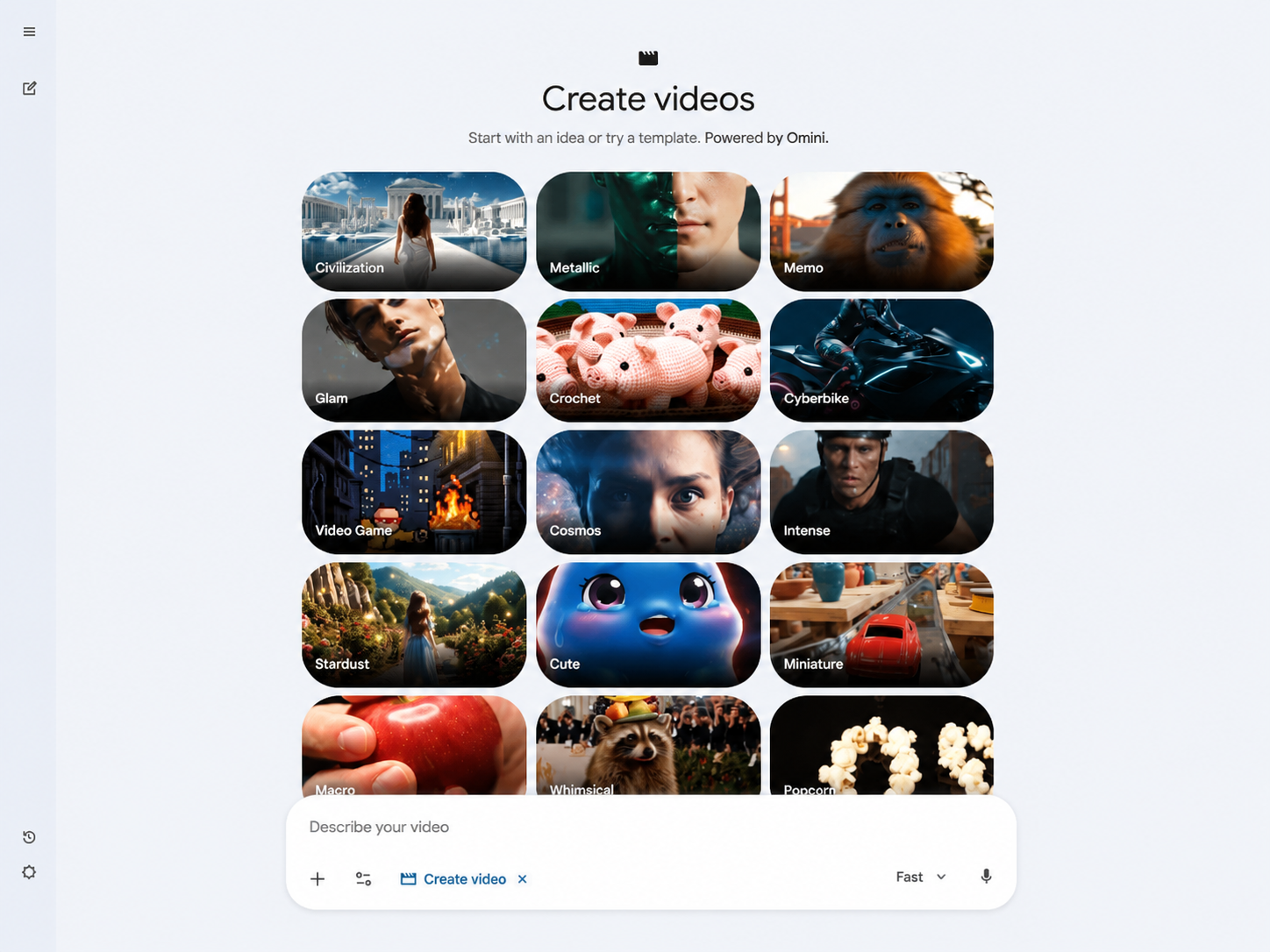
On May 2, 2026, X user @Thomas16937378 spotted a "Powered by Omni" button inside Gemini's video generation tab, next to the codename "Toucan" (Veo 3.1). The leak also surfaced a tagline: "Start with an idea or try a template. Powered by Omni." That phrasing suggests that what we know about Gemini Omni goes beyond a simple video model — it's being designed as an interactive creation tool, closer to a Deep Research agent than a simple text-to-video generator.
The anticipated launch window is Google I/O 2026 (May 19–20).
Early Leak Samples: What Is Gemini Omni's Output Actually Like?
Beyond the interface screenshots, a demo video was shared publicly on May 11, 2026, giving the first real look at Gemini Omni's generation quality. For everyone wondering what is Gemini Omni capable of in practice, here's what the leaked footage reveals.
Generation Quality: Strong, But Not the Strongest
A tester who viewed the sample put it plainly: "I won't lie, this is one of the best video models I have seen, maybe not the best, but a really strong performance." Specifically:
Prompt adherence is impressive: The model followed complex instructions closely across multiple shots, with generated content matching prompt descriptions with high fidelity
Only one documented flaw: A single shot was missing a centerpiece requested in the prompt — the sole visual error recorded in the entire demo
Visual quality is solid mid-to-upper tier: Motion smoothness and lighting were at a usable level, but testers explicitly noted that raw cinematic quality sits a full step behind ByteDance's Seedance 2.0
Bottom line: For anyone researching what is Gemini Omni's real generation quality, the Flash version produces footage that "looks good," but if you're chasing maximum visual fidelity, Seedance 2.0 and Kling V3.0 remain the better choices right now.
Editing Capabilities: The Real Surprise
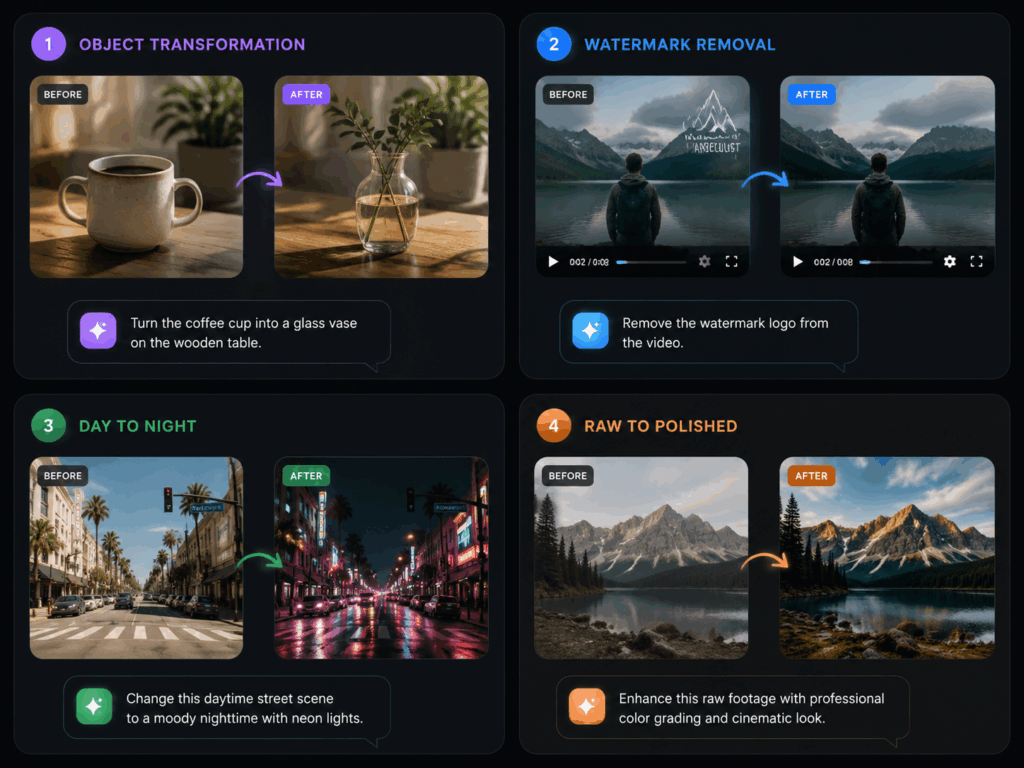
Generation quality may not be the absolute best, but when evaluating what is Gemini Omni's real competitive edge, the leaked samples genuinely surprised testers in video editing performance. The following features performed "unusually well" in the leaked build:
Video Remixing: Upload an existing video, then modify its content through natural language commands
Object Replacement: Swap elements in an existing frame using natural language — "replace the cup on the table with a vase," and the model executes directly
Watermark Removal: Strip or replace platform watermarks cleanly
Scene Rewriting: Regenerate specific portions of a clip based on a new prompt, rather than redoing the entire segment
For a model making its first public appearance, the editing capabilities are significantly more polished than the raw generation — confirming Google's "Nano Banana" strategy logic: lead with editing and ecosystem integration, then catch up on generation quality through subsequent updates.
Flash vs Pro: We May Only Be Seeing the Tip of the Iceberg
All leaked samples are widely believed to come from the Flash tier. When asking what is Gemini Omni's full potential, the leak also revealed a new Gemini settings page with a "usage limits" tab, and multiple testers reported that video generation burned through credits quickly — indirectly suggesting the current build is the lightweight version. If the Pro tier delivers meaningfully better generation quality (longer clips, higher resolution, better lighting and texture detail), then Gemini Omni's true capability ceiling remains unseen.
What Is Gemini Omni's Video Generation Capability in Detail?
To properly answer what is Gemini Omni, we need to look at the leaked samples, Google's existing Veo 3.1 (Toucan) baseline, and the Nano Banana strategy pattern. Here's what creators care about most.
Text and Image to Video
The core workflow: input a prompt or upload a reference image, receive a video clip. Veo 3.1 already handles roughly 15-second clips with scene extension. Based on the leaked samples:
Clip duration: Estimated 5–15 seconds for Flash, possibly 15–30 seconds for Pro
Resolution: Not explicitly confirmed in leaks, but based on the Veo 3.1 baseline, likely 720p–1080p
Motion consistency: Mid-to-upper tier — no obvious flickering or morphing issues, but fine motion (fingers, fast object tracking) needs more sample validation
Prompt understanding depth: This is Gemini Omni's standout — powered by Gemini's language foundation, the model follows complex scene descriptions more accurately than most competitors
Conversational Video Editing: The Biggest Differentiator
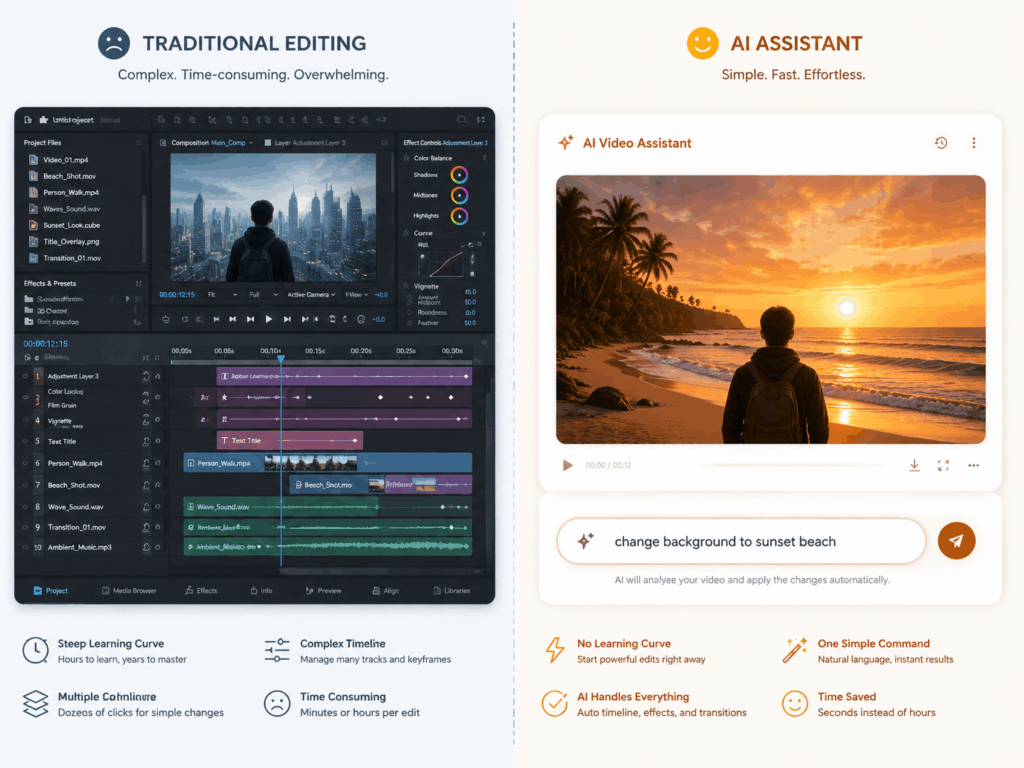
This is the feature most likely to change how creators work. For anyone asking what is Gemini Omni's biggest differentiator, the answer is conversational editing. Unlike traditional AI video tools that force a "generate → dissatisfied → rewrite prompt → regenerate" loop, Gemini Omni lets you talk directly to your generated video:
If the final release can deliver these capabilities reliably, video modification cost drops from "minutes" to "seconds."
Template-Based Creation: Lowering the Entry Barrier
The "Start with an idea or try a template" language from the leak suggests Google is targeting non-professional users directly. Pre-built templates will likely cover:
Social media short-form video (9:16 vertical, 15–60 seconds)
Product showcase videos (e-commerce, app demos)
Tutorial and explainer content (animated diagrams with narration)
For creators who don't want to spend time mastering prompt engineering, templates may be the most practical entry point.
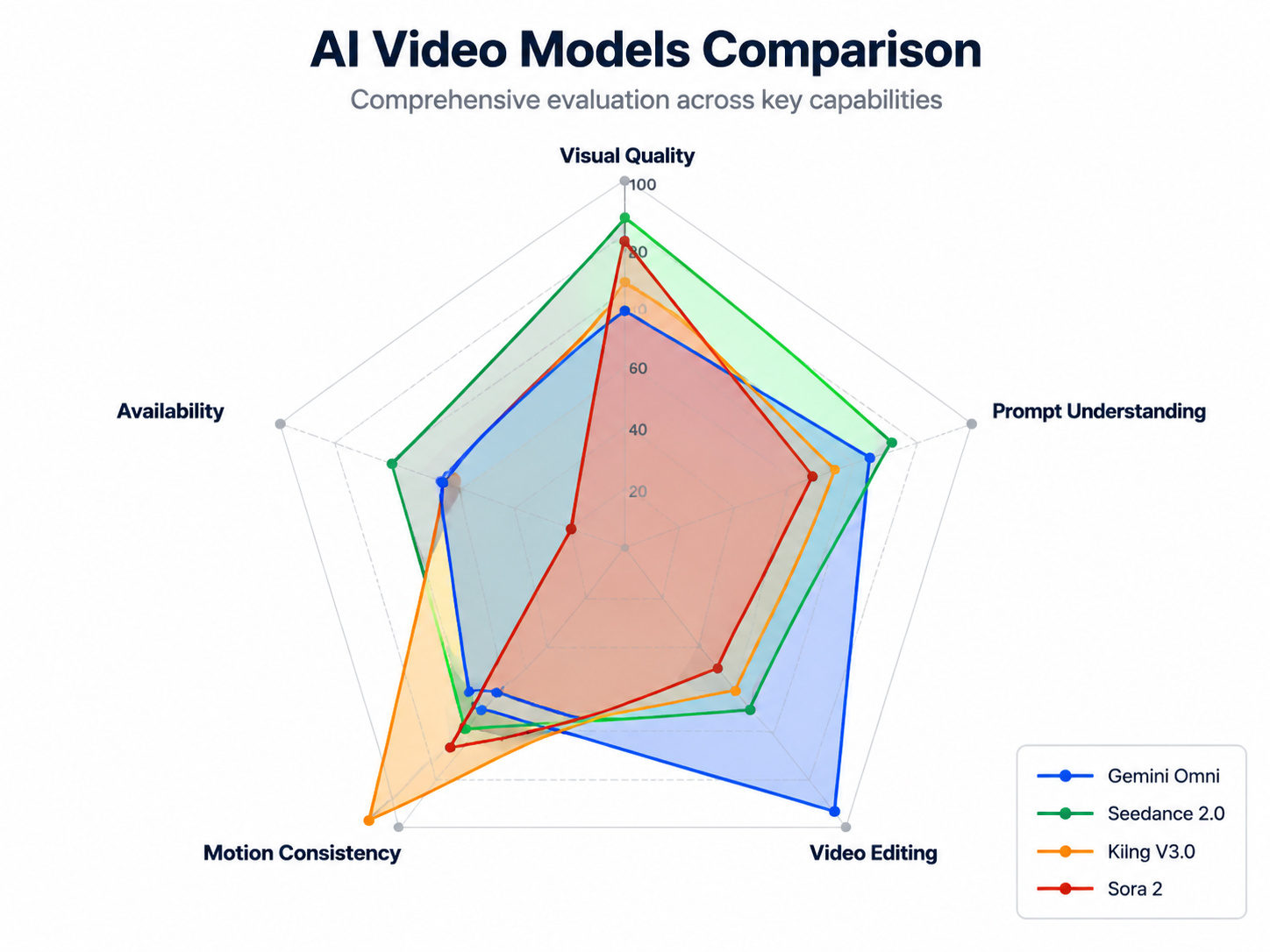
How Does What Is Gemini Omni Compare to Current AI Video Models?
From a creator's practical perspective, here's an intuitive comparison of Gemini Omni against currently available models:
Bottom line: If you chase raw visual fidelity and motion realism, Seedance 2.0 and Kling V3.0 remain the top picks. But if you need rapid iteration, flexible modification, and template-driven production, Gemini Omni's conversational editing could be a game-changer.
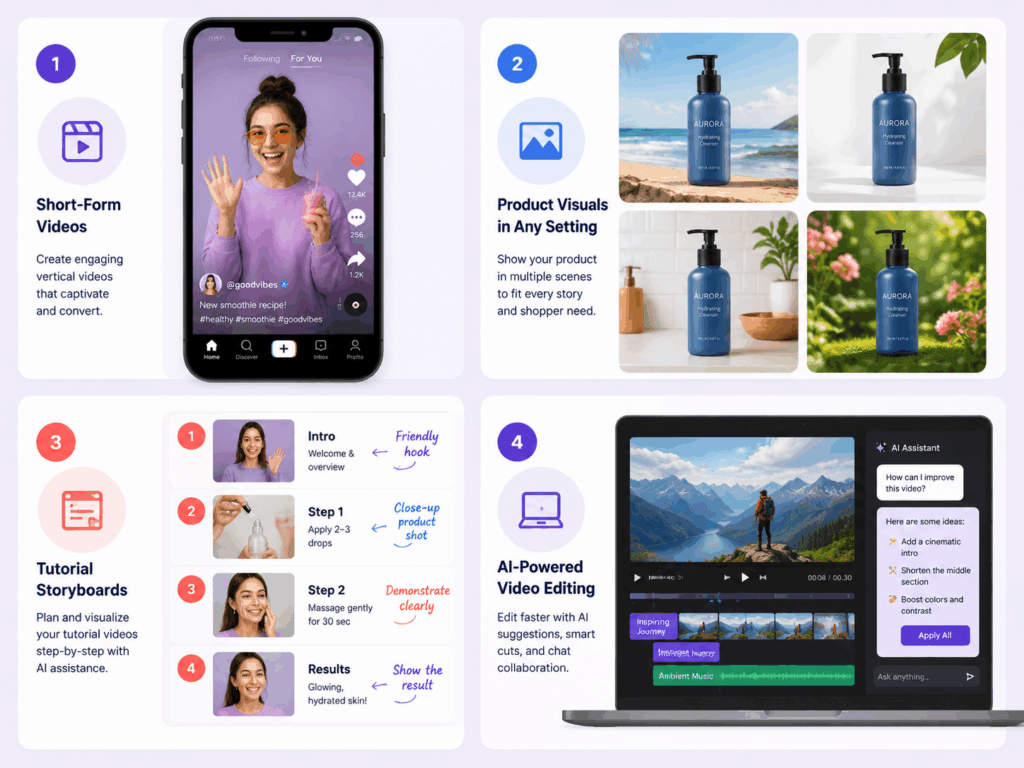
What Is Gemini Omni Best For? Content Use Cases
When considering what is Gemini Omni best suited for, the leaked samples reveal a clear capability profile. Here are the creation scenarios where it's most likely to excel post-launch.
Great Fit
1. High-Volume Social Media Content The template + conversational editing combo is tailor-made for creators who need high-frequency output. Write one prompt → generate a base video → quickly adjust multiple versions through conversation → batch export in different sizes and styles. This workflow could be faster on Gemini Omni than any existing tool.
2. Product Videos and Ad Creative Object replacement and scene rewriting are naturally suited for e-commerce and marketing. A single product video can be rapidly adapted into multiple backgrounds, color schemes, and contexts — dramatically reducing shoot and post-production costs.
3. Tutorials and Explainer Videos Template creation + partial scene rewriting makes tutorial video iteration significantly more efficient. Modifying a diagram in one frame, replacing a specific animation segment — no need to redo the entire piece.
4. Quick Video Post-Production If you already have footage, Gemini Omni's Remix feature lets you apply AI modifications directly — remove watermarks, swap backgrounds, add/remove elements — without importing into Premiere or After Effects.
Not Yet Ideal
1. Cinematic Visual Content The Flash version's visual quality is still a clear step below Seedance 2.0 and Sora 2. If you need high-fidelity, cinematic footage (ad films, music videos, film trailers), stick with Seedance 2.0 or wait for Pro version validation.
2. Complex Human Motion No leaked sample has demonstrated complex human motion test cases. Kling V3.0 remains the leader in human movement (dance, sports, hand gestures) — Gemini Omni needs more samples to prove itself here.
3. Long-Form Video The initial version is estimated to support 15–30 second clips at most. For minute-long or longer videos, you'll still need traditional editing tools or multi-clip stitching solutions.
When Can You Use It — and How?
Expected Launch
Google I/O 2026 (May 19–20) is the most likely formal unveiling. Here's the leak timeline:
Expected Access
Gemini App (gemini.google.com): The most direct entry point, likely through a feature flag or early access program
VisualGPT: Once Gemini Omni is publicly available, VisualGPT will be among the first platforms to integrate it, offering a creator-friendly interface with additional workflow tools. If you want to experiment through a streamlined creative platform rather than Google's developer-focused interface, keep an eye on VisualGPT's AI video generator post-I/O.
Expected Pricing
Following Google's existing Flash/Pro tier pattern:
The Verdict: What Is Gemini Omni Worth for Creators?
Back to the core question everyone is searching: what is Gemini Omni, and is it worth the wait for AI video creators?
If your priority is visual quality — no rush. Seedance 2.0 and Kling V3.0 already deliver top-tier output, and for anyone researching what is Gemini Omni's raw generation quality, the Flash version doesn't catch up yet.
If your priority is workflow efficiency — absolutely worth waiting. Conversational editing, template-based creation, and video remixing capabilities, if they work reliably, will dramatically reduce video creation iteration costs. Especially object replacement and partial scene rewriting — capabilities that no other AI video tool currently does well (or at all).
Best strategy: Use existing tools for quality-critical projects, and watch the I/O 2026 announcements. Once you see what is Gemini Omni's actual launch quality, you can try it first on VisualGPT and validate with real projects whether it deserves a spot in your daily workflow.
Want to be first in line when Gemini Omni goes live? VisualGPT is monitoring the I/O 2026 announcements and will integrate Gemini Omni as soon as it becomes available — giving you a creative-first interface to discover what is Gemini Omni alongside your existing AI video generator workflows.